Plugins › Elite Balance › Switch from TeraWallet
For stores on TeraWallet
Moving from TeraWallet? Bring every balance with you.
Elite Balance imports your customers' TeraWallet balances and their full wallet history in one guided step, then shows you the totals match to the cent.
Full refund within 30 days of purchase, through WooCommerce.com.
Rather not do it alone? The first 100 stores get the migration done for them, free. How it works
Watch the 1:32 migration video · Try the live demo · Already bought? Claim your migration
- Approved for the WooCommerce Marketplace
- TeraWallet's data is never changed
- Block checkout and HPOS ready
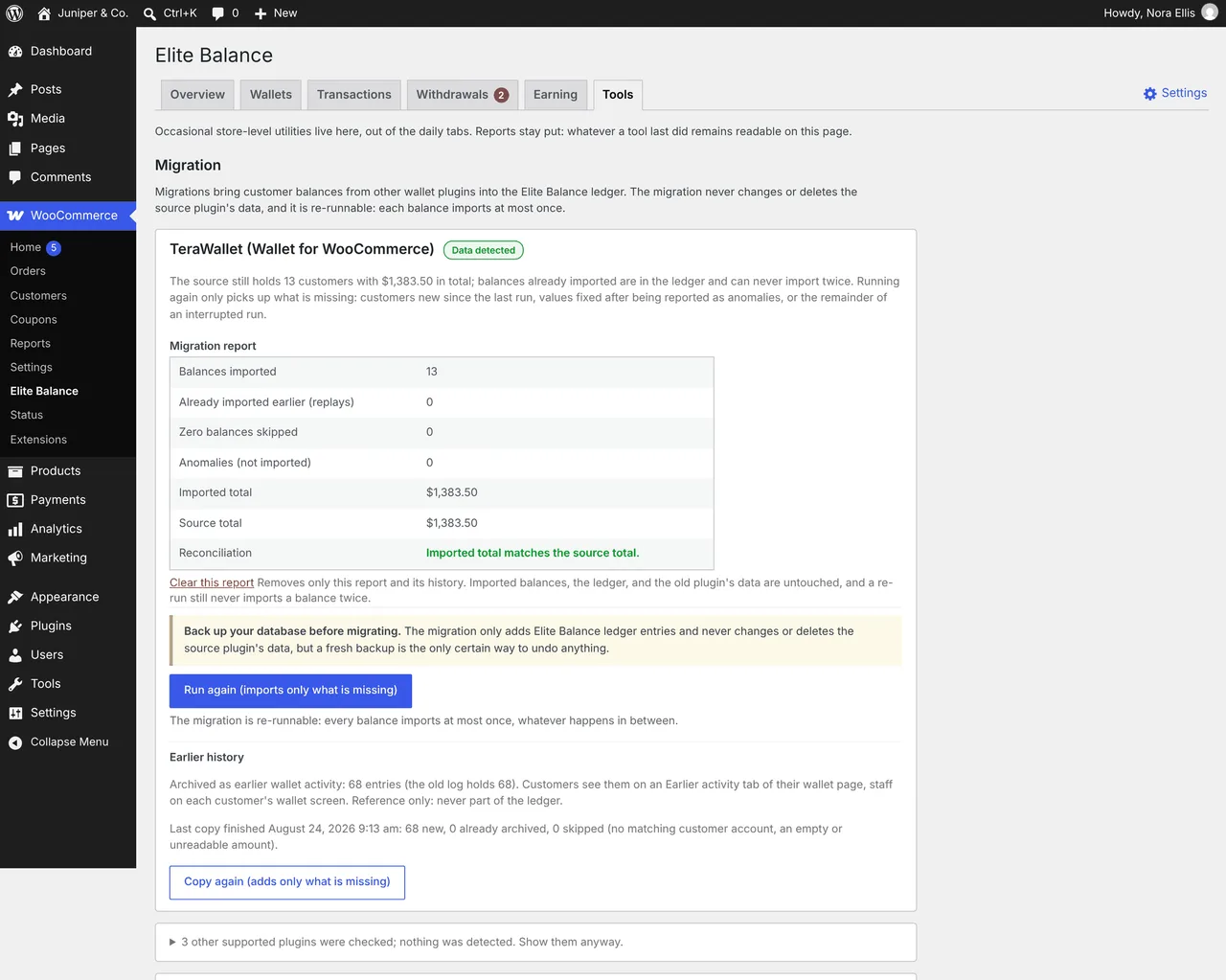
Totals match
Proven on a busy store
One US retailer moved 194,913 wallets into Elite Balance. Every one reconciles.
- customer wallets moved
- 194,913
- in customer balances (about)
- $4M
- history entries archived
- 218,323
A US apparel store, moving from another wallet plugin. After the move, every wallet passed the reconcile check, which compares each balance with its own history line by line. TeraWallet stores go through the same migration engine and the same check.
What you get
Built for stores that want every balance on a ledger they can check.
TeraWallet is a popular, well-maintained free plugin, and plenty of stores never need more. If you are weighing a move, this is how Elite Balance handles the money.
Every balance, provable
Each change is a ledger entry with a running balance. One check proves every wallet against its own history.
No double charges
A replayed payment notice, a double click or a retried webhook is applied once, and only once.
Safe with off-site gateways
Wallet money at checkout is held first and taken only when the gateway confirms. Abandoned checkouts give it back.
Cashback that survives refunds
Rewards wait as pending until your refund window passes, and reverse by themselves if the order is refunded.
What comes across
Your customers keep their money and their history.
- Every balanceWorked out the way TeraWallet works it out: credits minus debits, deleted entries left out. Each customer starts with one "Migrated balance" entry.
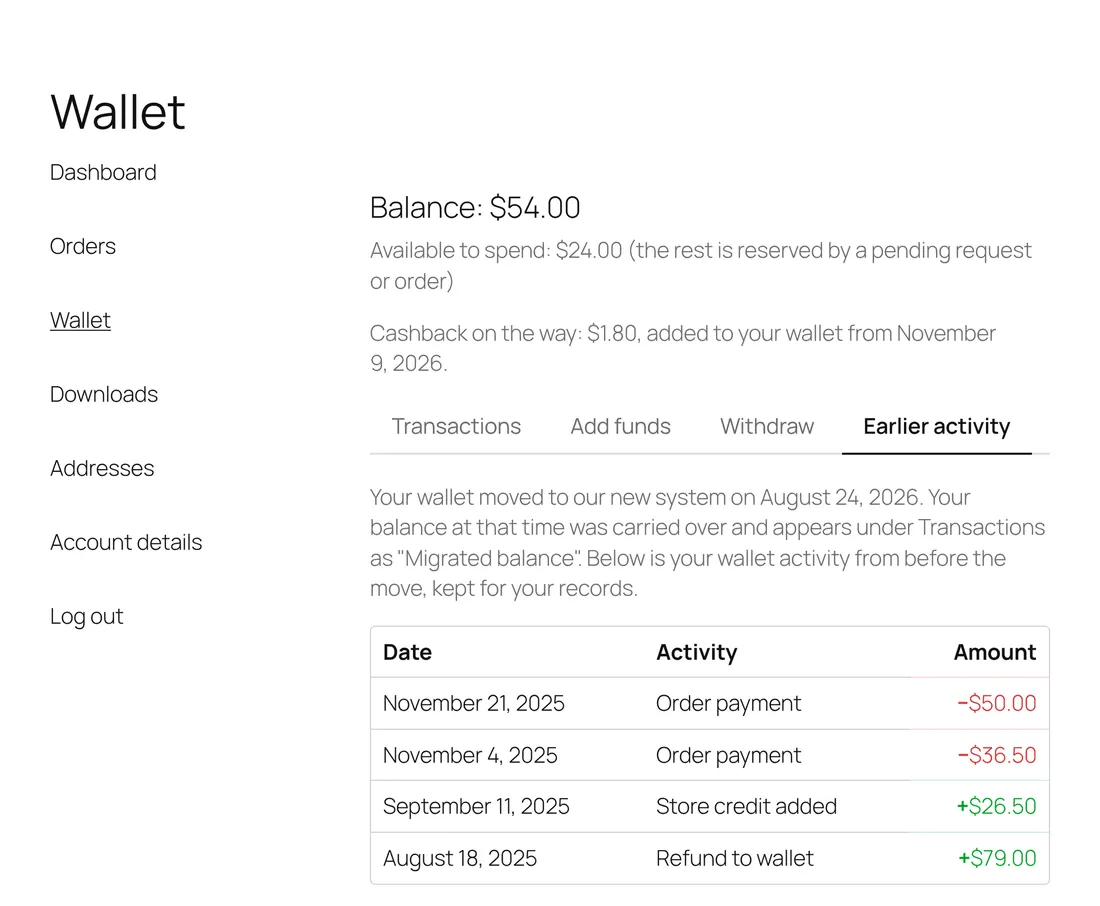
- The full wallet historyCopied read only. Customers see it on an Earlier activity tab, and your staff see every original detail.
- Your TeraWallet data, untouchedElite Balance only reads it. Nothing in TeraWallet's tables is changed or deleted.
- Quiet inboxesThe migration credit sends no wallet email, so nobody wonders why their balance "arrived".
How the switch works
Six steps, all on one screen.
- Back up your databaseAlways, for any migration. It is the one certain undo.
- Install Elite BalanceActivate it beside TeraWallet. Nothing changes for customers yet.
- Open Elite Balance > ToolsTeraWallet is detected, with how many customers hold a balance and the total to import.
- Start the migrationTeraWallet and its add-ons are switched off first, so no balance moves mid-import. Their data stays put.
- Read the reportImported total against TeraWallet's own total, and a list of anything not imported, with the reason.
- History followsThe copy of TeraWallet's log starts by itself. Spot-check a few customers and you are done.
# Prefer the command line?
wp rb-elbal migrate terawallet --deactivate
wp rb-elbal history copy terawallet
wp rb-elbal reconcile
Every step in detail: Migrating from another wallet plugin, in the documentation.
Before you switch
Three things worth knowing first.
Other currencies are not converted
Balances held in a currency other than your store's are listed for you to review. We never make up exchange rates.
Nothing is dropped silently
Zero balances are skipped. Anything negative or unreadable is listed in the report, not imported.
Store credit does not expire
If you rely on TeraWallet Pro's wallet expiry or its AffiliateWP link, plan for that before you switch.
Two ways to switch
The move takes a few clicks. If you would rather not do it alone, we will do it with you, free.
Most stores run the migration themselves from one screen. If you would rather have the team that built Elite Balance run it for you, buy your license and claim a free migration. Open to the first 100 stores.

Then, who runs the migration?
You run it
Included with your license
- One screen: Elite Balance > Tools
- A report that checks every total against TeraWallet's
- A step-by-step guide and a 1:32 video
We run it for you
Free with your license
- A fresh backup before anything changes
- The migration run at a quiet hour you pick
- Every total checked with you before we finish
- Done by the team that built Elite Balance
Buy first, then claim with your order number, just below. After the first 100, the self-serve migration stays included with every license.
Already bought Elite Balance?Claim your free migration. Have your WooCommerce.com order number ready.
Send us your order number. We will take it from there.
- Buy Elite BalanceOn WooCommerce.com. Keep this page open, then come back here.
- Send us your order numberIt is in your WooCommerce.com receipt email.
- Pick a quiet hourWe usually reply within a few hours to agree a time.
No passwords now. We ask for access only once we have agreed a time.
Claim received.
We will write to , usually within a few hours, to agree a quiet hour for the move. A copy of your message is on its way to you now.
FAQ
Before you click buy.
What TeraWallet stores ask before they switch.
Will my customers' balances change?
No. Each customer starts with exactly the balance TeraWallet calculated: all credits minus all debits, leaving out deleted entries. TeraWallet rounds tiny fractions of a cent down for display, so in rare cases a balance comes across up to half a cent higher than it showed.
Will customers notice the switch?
They see the new wallet page, with their old activity on an Earlier activity tab, and they get no email about the move. One setting hides that tab if you prefer.
Does it work with the block checkout and HPOS?
Yes. The classic checkout and the Cart and Checkout blocks are both supported, including partial wallet payments, and Elite Balance is compatible with WooCommerce High-Performance Order Storage.
Can I go back to TeraWallet?
The migration never changes TeraWallet's data, so you can reactivate it. Do that before customers spend from their new wallets, or the two will no longer match.
Can I try it before I commit?
Yes. Launch the live demo store, or run the migration on a staging copy of your store first, which we recommend for any store. And WooCommerce.com gives a full refund within 30 days of purchase for extensions bought on its Marketplace.
How does the free migration work?
Buy Elite Balance on WooCommerce.com, then send us your order number with the claim form on this page. We take a fresh backup, run the migration with you at a quiet hour you pick, and check every total with you before we finish. It is free for the first 100 stores; the license itself is $89 a year. After that, the self-serve migration stays included with every license.
Move your wallets to a ledger that proves every cent.
$89 a year on WooCommerce.com, with a full refund within 30 days. A free migration for the first 100 stores.
Page updated by the RoundBorders team. TeraWallet is a trademark of its owner. Elite Balance and RoundBorders are not affiliated with or endorsed by TeraWallet. More about Elite Balance.