WooCommerce store credit expiry: how to set it, and what should never expire
Unspent store credit is money you owe. Expiry clears it, but done badly it costs you the customer, and in some places it breaks the law. Which credit can expire, how long to give people, and three ways to set it up in WooCommerce.

Published 8 min read
The short answer
Let free credit expire: cashback, rewards, bonuses and goodwill credits, each with a clear date and one reminder before it runs out. Do not put a date on money a customer paid in or took in place of a refund until you have checked the law where you sell. And never apply a new expiry rule to credit customers already hold.
Every dollar of store credit in a customer’s wallet is a dollar you owe. It stays on your books until it is spent, and some of it never will be. An expiry date clears it. Done badly, it also costs you the customer, and in some countries it breaks the law.
This post covers which credit can expire, which should not, how long to give people, and three ways to set it up in WooCommerce. We make a WooCommerce wallet plugin, so weigh our part of the last section accordingly; everything before it holds whichever tool you use.
Should store credit expire?
Some of it. The test is who paid for it. Credit you gave away, such as cashback, a signup reward or a goodwill gesture, is a marketing cost, and a deadline is part of the offer. Credit a customer paid for, or accepted in place of a refund, is their money held by you, and the law in several countries protects it for years.
That is the whole test: did the customer pay for it?
Not all credit is the same
A wallet holds several kinds of credit at once. Decide expiry kind by kind, not for the wallet as a whole.
| Kind of credit | Who paid for it | Should it expire? |
|---|---|---|
| Cashback on orders | You | Yes. It exists to bring the customer back. |
| Signup, review and birthday rewards | You | Yes, and soon. They are small and meant to be used. |
| Top-up bonuses (pay 100, get 110) | You, for the bonus part | The bonus can. The paid part is a top-up. |
| Goodwill credit from staff | You | Usually, with a longer window. It is an apology, so be generous. |
| Paid top-ups | The customer | No, unless you have checked the law. |
| Refunds to store credit | The customer | No. They took credit in place of their money. |
One more rule holds the table together. When a customer spends, the credit that expires soonest should go first. Otherwise people lose credit while holding a balance they thought was safe.
What the law says about money customers paid
I am a developer, not a lawyer, and the rules differ by country and by US state. These three show the pattern. Check your own market before you put a date on paid credit.
- United States (federal). Under 12 CFR 1005.20, the funds on a store gift card issued in exchange for payment must last at least five years from issue or from the last load. Loyalty, award and promotional cards are excluded from that rule, but they must say that they are promotional and show their expiry date. States can be stricter.
- Ireland. The Consumer Protection (Gift Vouchers) Act 2019 sets a minimum of five years from purchase for a gift voucher that has an expiry date. A shorter date is read as five years. Loyalty scheme vouchers, promotional vouchers and vouchers issued as a refund for returned goods fall outside the Act.
- Australia. Gift cards must stay valid for at least three years. Cards given free in a promotion, and bonus cards from a loyalty program used at the same business, are exempt.
A wallet top-up is not called a gift card, but it is the same thing in substance: money paid in advance for later purchases. Treat it as one until someone qualified tells you otherwise.
The pattern is consistent. Free and promotional credit can carry a short date if the date is shown. Paid credit gets years, where it can expire at all.
How long is fair?
There is no standard, so these are the windows I would start from.
- Signup, review and birthday rewards: 30 to 60 days. Short enough to prompt an order.
- Order cashback: 90 to 180 days. Match it to how often your customers reorder. If people buy from you twice a year, 60 days expires credit nobody had a chance to use.
- Goodwill credit: 12 months.
Whatever you choose, make it longer than your returns window. Credit that expires before a customer could reasonably come back is a discount you never meant to honour.
How do you tell customers before it expires?
An expiry date nobody sees does one thing: it produces a support ticket the day after. A date people see produces orders.
- Show the date where the balance is. On the account page and next to the balance, in plain words: the amount and the day it goes.
- Send one reminder. A few days before, with the amount, the date and a link to the shop. One email listing everything about to go, not a weekly nag.
- Say how spending works. Tell customers their purchases use the soonest-expiring credit first, so they do not have to plan around it.
What about credit you already gave?
Leave it alone. The quickest way to turn expiry into a complaint is to switch it on and apply it to balances customers already hold. They earned that credit with no date on it.
Apply expiry only to credit given from the day you turn it on. If you later shorten a window, the same applies: existing credit keeps the date it was given.
Three ways to set up expiry in WooCommerce
| A coupon (built in) | A wallet plugin with expiry | Elite Balance | |
|---|---|---|---|
| Cost | Free | Varies; expiry is often a paid feature | $89 a year |
| Is it a balance? | No: one code, one use | Yes | Yes, on a ledger |
| Expiry per kind of credit | One date per coupon | Check before you buy | Yes, in days per kind |
| Reminder before expiry | No | Check before you buy | Yes, one email listing what is about to expire |
| Existing credit protected | Does not apply | Check before you buy | Yes |
1. A coupon. WooCommerce’s own coupons have an expiry date field. For a one-off apology or a single reward, a coupon with a date is enough, and it is free. It stops working once you want a running balance, partial spending or a customer who can see what they hold.
2. A wallet plugin. Several wallet and store credit plugins offer expiry. Before you pick one, ask four things. Can paid top-ups be excluded? Does spending use the soonest-expiring credit first? What happens to balances that exist today? Does the customer get a warning?
3. Elite Balance. This one is ours: Elite Balance, a premium wallet for WooCommerce, $89 a year on the WooCommerce Marketplace. We make it, so we are not neutral; the four questions above are the fair test for any tool, ours included. Expiry is off until you turn it on. To set it up:
- Go to WooCommerce > Settings > Elite Balance, then open the Expiry section.
- Tick Enable expiry.
- For each kind of credit, enter the number of days before it expires. Every kind starts at 0, which means never, so nothing expires until you enter a number. There are six kinds: cashback, top-up bonuses, rewards (sign-up, reviews, birthdays), credit added by staff, paid top-ups, and refunds to the wallet. The last two carry a stored-value warning right under the field.
- Under WooCommerce > Settings > Emails, open “Wallet credit expiring soon” and set how many days ahead it is sent. The default is 7.
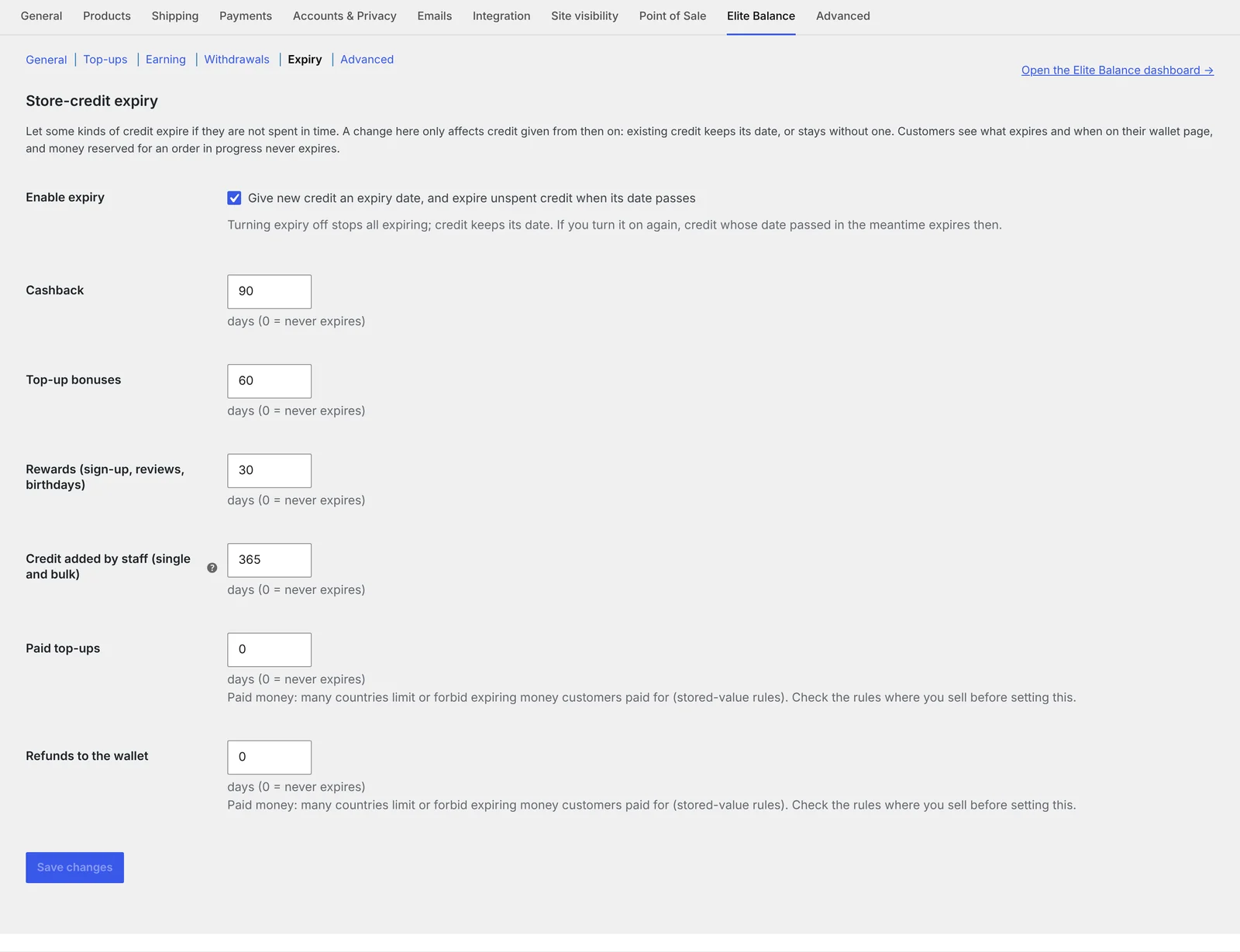
From then on, new credit gets its date. Credit given before you turned expiry on never expires, and changing a setting later never changes a date already given. Cashback’s clock starts when it lands in the wallet, not while it is still pending.
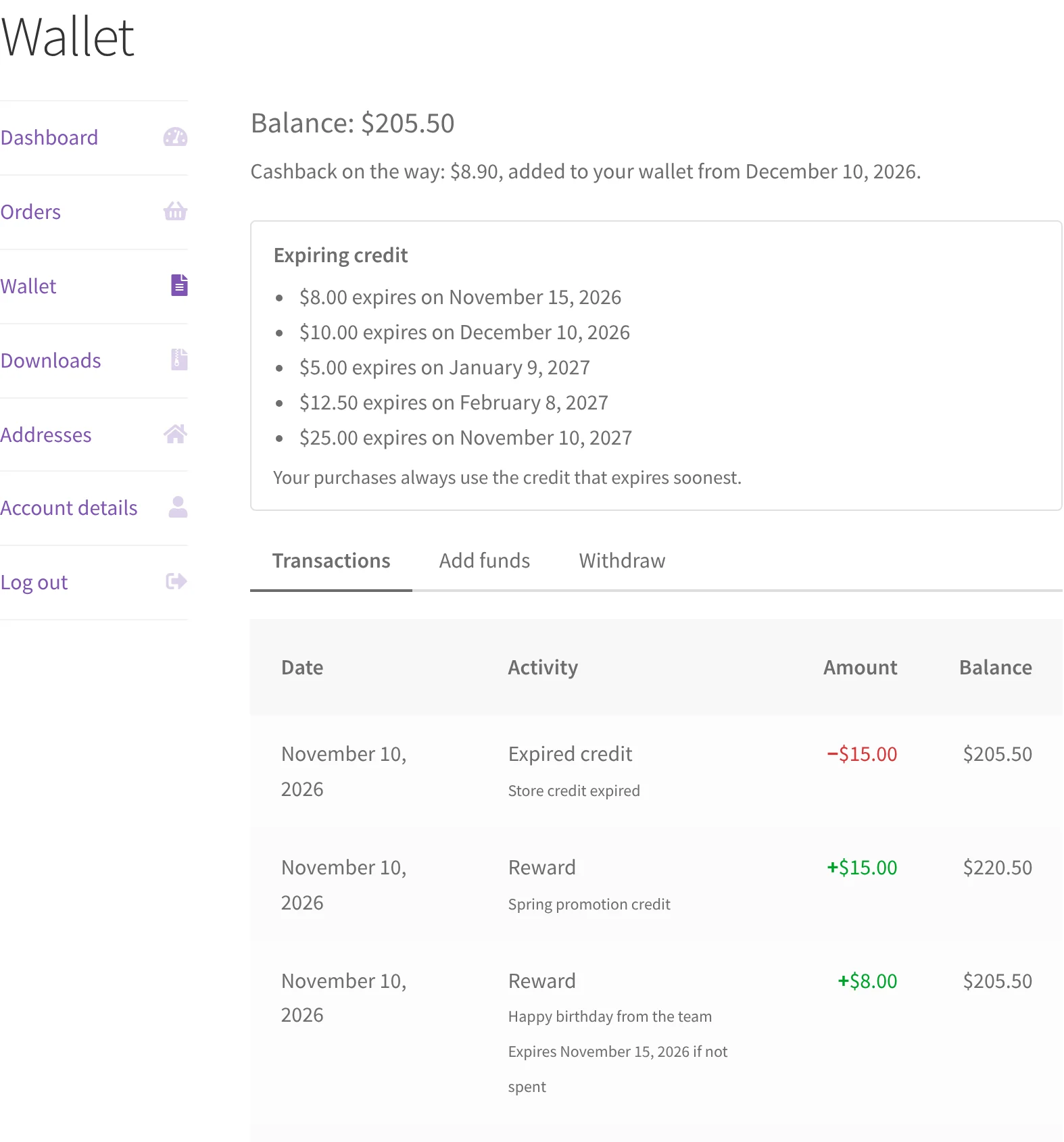
Customers see what expires and when on their wallet page, and their purchases always use the credit that expires soonest. Credit reserved for an order in progress never expires while it is reserved.
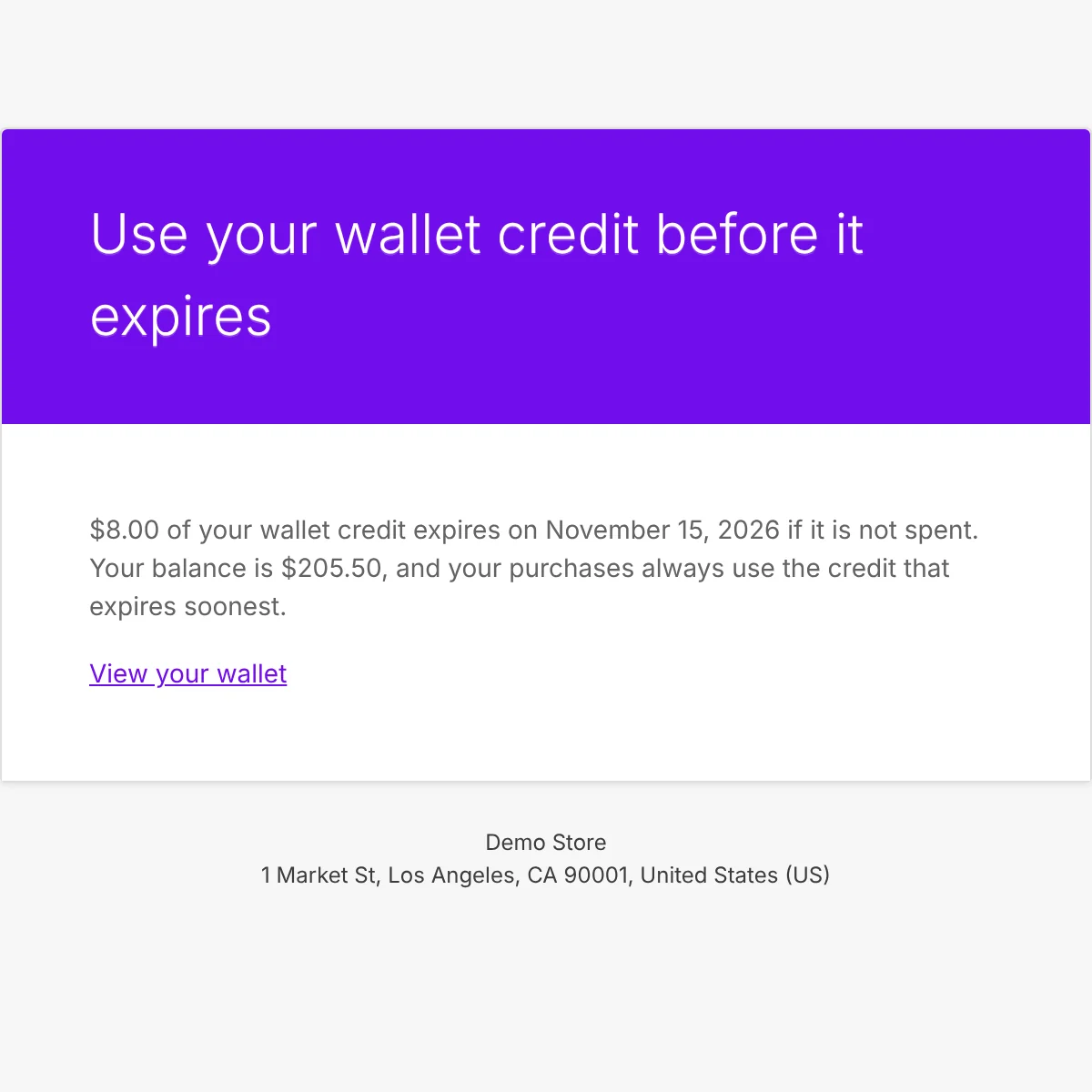
A few days before credit expires, the customer gets one email listing everything that is about to go. Each credit is announced once.
Staff can extend or remove the date on a credit that has one, with a required note that is logged on the customer’s wallet screen. Dates cannot be shortened, and credit without a date cannot be given one later.
Already on another wallet plugin? Elite Balance imports balances from TeraWallet, WP Swings Wallet System, YITH WooCommerce Account Funds and Account Funds for WooCommerce. Imported balances come in without a date, so they never expire. If you are on TeraWallet today, our switching guide shows what comes across and how the move is checked.
How do you see what you owe, and what is about to expire?
Expiry is also an accounting event. Unspent credit is a liability, and expired credit comes off it. Your accountant will ask for two numbers: what you owed customers on a given date, and how much expired in the period.
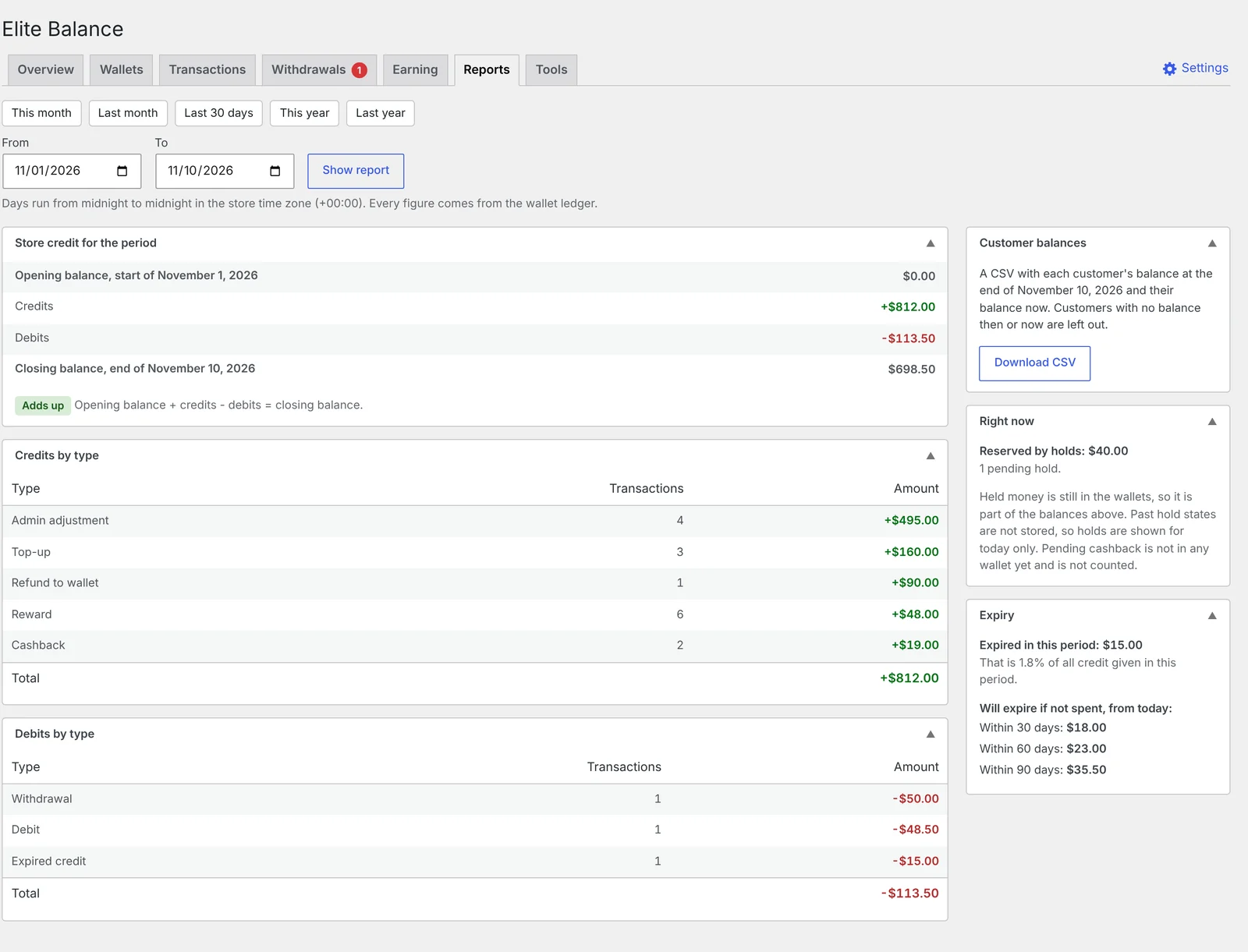
If your setup cannot answer both, keep a monthly export of balances. In Elite Balance the Reports tab gives the store credit owed at the start and end of any period, what came in, went out and expired in between, and a check that it adds up. It also shows what will expire within 30, 60 and 90 days if it is not spent, and a CSV of each customer’s balance.
The short version
Decide expiry by kind of credit, and ask who paid for it. Free credit can expire: cashback, rewards, bonuses, goodwill. Paid top-ups and refunds to credit should not, unless the law where you sell allows it and you have checked. Make the window longer than your returns window, show the date, and send one reminder. Never apply a new rule to credit customers already hold.
If refunds are where your store credit comes from, How to refund to store credit in WooCommerce, and when to offer it covers when to offer it and when the customer decides.
From the RoundBorders team
Need a hand with your site?
Tell us what’s going on. We send a fixed price, usually within a few hours.
- Nothing to pay until you approve a price
Write as much as you like: what's happening, what you want, links, errors. The more we know, the more exact your fixed price.
Founder of RoundBorders. Building and fixing WordPress sites since 2012; our work is listed in the WooCommerce, Pressable and Jetpack partner directories.
Sources
- 12 CFR 1005.20, Requirements for gift cards and gift certificates, Electronic Code of Federal Regulations
- Gift vouchers: information for businesses, Competition and Consumer Protection Commission, Ireland
- Selling gift cards, Queensland Government
- Coupon management, WooCommerce
Found a mistake? Write to me.