Pay WooCommerce Subscriptions renewals with store credit: how it works
WooCommerce Subscriptions renews from a card. It can renew from a customer's store credit too, if the wallet is built for it. What happens when the balance falls short, wallet only or wallet first, and three ways to set it up.

Published 9 min read
The short answer
Yes, with a wallet plugin built for it: the balance becomes the payment method of the subscription and is charged on each renewal date, like a card. The part that matters is the shortfall. A renewal the balance does not cover should fail, like a declined card, or take what the wallet has and charge the card the rest. It should never push the balance below zero.
A customer has $80 of store credit and a $25 monthly subscription with you. Every month WooCommerce Subscriptions charges their card $25, and the $80 sits there. They ask why the credit can’t pay for it. It is a fair question, and out of the box the answer is that it can’t.
This post covers how a renewal can be paid from store credit, what should happen when the balance falls short, the two ways to combine a wallet with a card, and three ways to set it up. We make Elite Balance, a WooCommerce wallet that renews subscriptions this way, so weigh our part of the last section accordingly; everything before it holds whichever tool you use.
Can WooCommerce Subscriptions renew from store credit?
Not by itself. Subscriptions charges the payment method saved on the subscription, and it renews automatically only through a gateway built to work with it. Store credit pays a renewal when a wallet plugin offers the balance as one of those payment methods. The wallet is then charged on the renewal date, the way a card would be.
The details come from how Subscriptions renews. For an automatic renewal, it creates a renewal order on the due date and charges the payment method through its gateway, with nothing for the customer to do. A gateway has to be written for this. One that is not can only offer manual renewals, where the subscription goes on hold until the customer logs in and pays the renewal order at checkout.
So “does my wallet plugin work with Subscriptions” is two questions. Can a customer pay a renewal order with their balance at checkout? Almost any wallet can. Can the wallet be charged by itself on the renewal date? That is the one to ask.
Why pay renewals from store credit at all?
- Prepaid plans. A customer tops up once, and the balance pays the next several renewals. Some customers prefer this to a card on file, and some have no card to keep on file.
- Credit that gets used. Cashback, rewards and refunds to store credit go toward the next renewal instead of sitting unspent. A customer whose credit pays part of their subscription has a reason to stay.
- Fewer failed cards. A renewal paid from a balance cannot hit an expired or declined card.
What happens when the balance does not cover a renewal?
This is the question that separates the tools, and it has three possible answers.
- The renewal fails. Nothing is taken, and Subscriptions handles it like a declined card: the renewal order fails and the subscription goes on hold until it is paid.
- The wallet pays what it can and a card pays the rest. The renewal goes through if the card does.
- The balance goes negative. The customer now owes you money through a wallet. No tool should do this.
What happens after a failed renewal depends on Subscriptions’ own failed payment retry system, and that is off until you turn it on under WooCommerce > Settings > Subscriptions. With it off, the subscription stays on hold until the customer pays the failed renewal from their account. With it on, Subscriptions tries again five times over seven days, emailing the customer along the way, so a customer who adds funds that week is renewed without doing anything else.
Check this first If you take renewals from a wallet, turn the retry system on. Without it, a customer who tops up a day late still has to come back and pay the failed renewal by hand.
Elite Balance gives the first two answers and never the third: a renewal paid from the wallet alone fails when the balance is short, and one set to wallet first takes what is there and charges the card the rest. How it handles each is further down.
Wallet only, or wallet first?
There are two ways to put a wallet on a subscription, and they suit different customers.
| Wallet only | Wallet first | |
|---|---|---|
| Payment method | The wallet | A card |
| The wallet pays | The whole renewal | As much as it has |
| The card pays | Nothing | The rest |
| Balance too low | The renewal fails | The card covers the difference |
| Suits | Prepaid customers, and customers without a card | Customers who earn credit and want it used |
Wallet only is the prepaid model: no card, and the customer keeps the balance topped up. Wallet first is the loyalty model: the card stays as the backstop, and whatever credit the customer has earned comes off each renewal.
One limit applies to wallet first. The card is charged a different amount each time, so its payment method has to allow the renewal amount to change. PayPal Standard is the best-known one that does not, because PayPal bills the fixed amount itself.
Elite Balance does both, and the customer picks per subscription.
How do you warn customers before a renewal?
A prepaid subscription fails quietly unless the customer knows what is coming. Two things prevent most failed renewals:
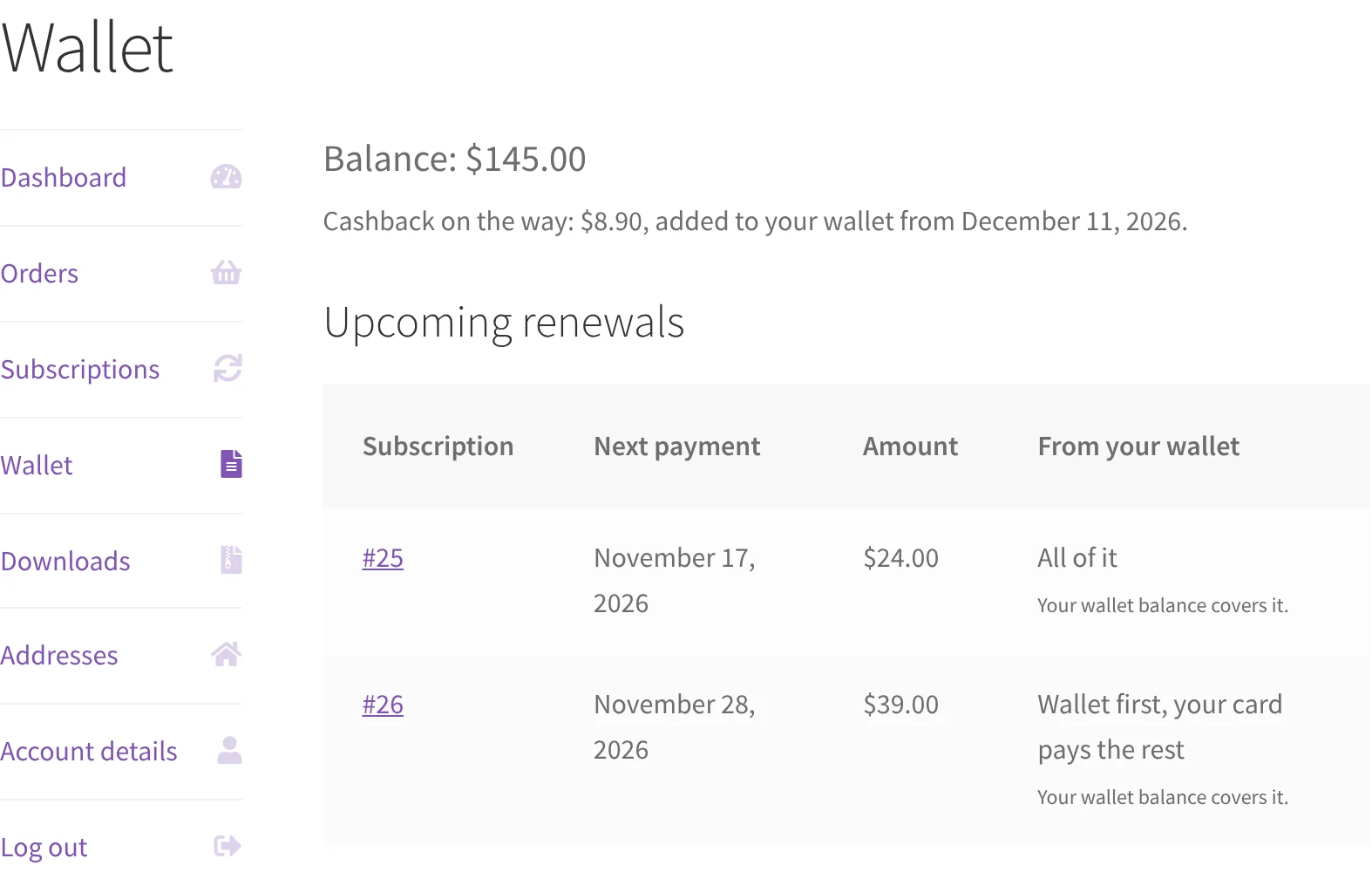
- Show upcoming renewals next to the balance. The customer should see, on the same page as their balance, which renewals are due, when, and for how much.
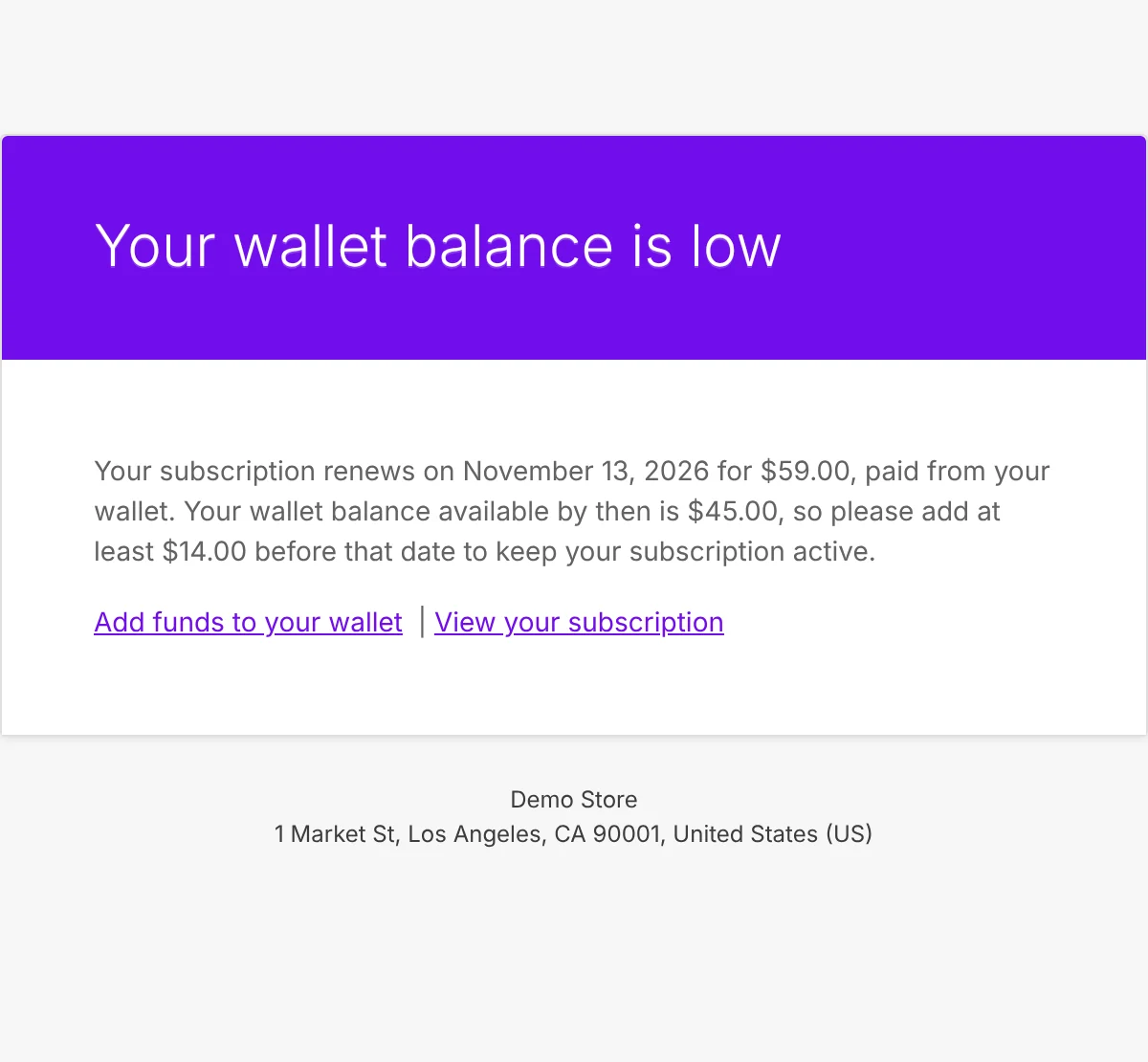
- Email them when the balance will not cover the next one. A few days ahead, with the renewal date, the amount, the balance and the shortfall. Once per renewal, and only when there is a shortfall.
Six questions to ask any wallet plugin
- Is the wallet charged automatically on the renewal date, or does the customer have to pay each renewal order by hand?
- What happens when the balance is short: fail, part-pay, or go negative?
- Can a renewal be charged twice if the scheduled renewal runs twice? It happens, and the wallet should recognise the second attempt.
- Does the customer choose to pay from the wallet, per subscription, or can it be switched on for them?
- Can a customer start a free trial on the wallet with an empty balance?
- Does the customer get a warning before a renewal the balance will not cover?
Three ways to set it up in WooCommerce
| Manual renewals | Account Funds | Elite Balance | |
|---|---|---|---|
| Renews by itself | No | Ask first | Yes |
| Balance too low | Customer pays another way | Ask first | Fails, or the card pays the rest |
| Wallet first | By hand, at checkout | Ask first | Yes, per subscription |
| Low-balance warning | No | Ask first | Yes |
| Cost | Free | $89 a year | $89 a year |
All three also need WooCommerce Subscriptions itself, which is a separate paid extension.
1. Manual renewals with any wallet. Subscriptions can let customers renew by hand: the renewal order is created, the subscription goes on hold, and the customer pays it at checkout with any method on offer there, a wallet balance included. It works with a free wallet plugin and needs no special support. The cost is that every renewal depends on the customer coming back to pay, which is the thing subscriptions exist to avoid.
2. Account Funds for WooCommerce. WooCommerce’s own store credit extension lists Subscriptions support, and its product page says “Customers can use store credit to pay for subscription renewals.” The page does not say what happens when the balance falls short, which is why the table says to ask first: put the six questions above to its support before you buy.
3. Elite Balance. This one is ours: Elite Balance, a premium wallet for WooCommerce, $89 a year on the WooCommerce Marketplace. We make it, so we are not neutral; the six questions are the fair test, and the rest of this section is how it answers them.
Wallet only
The customer picks “Wallet balance” as the payment method, either at checkout or later under My Account > Subscriptions > Change payment. On each renewal date the wallet is charged the full amount. Switching an existing subscription to the wallet charges nothing, and a free trial can be started with an empty wallet.
A short balance fails the renewal. The wallet pays all of it or none of it, never part, and the balance never goes below zero. The renewal order fails, the subscription goes on hold, and Subscriptions’ own emails and retries take over.
The customer’s wallet page lists what is coming: each subscription, its next date, the amount, and whether the balance covers it.
Three days before a renewal the balance will not cover, the customer gets a “Wallet balance low before renewal” email with the shortfall, once per renewal. The number of days is a setting. It goes only to wallet-only subscriptions, since on wallet first the card pays whatever the wallet does not.
Wallet first
The store turns on “Wallet first for renewals” under WooCommerce > Settings > Elite Balance > General. Each customer then switches it on per subscription from their account; staff cannot do it for them. The wallet pays what it can and the card pays the rest.
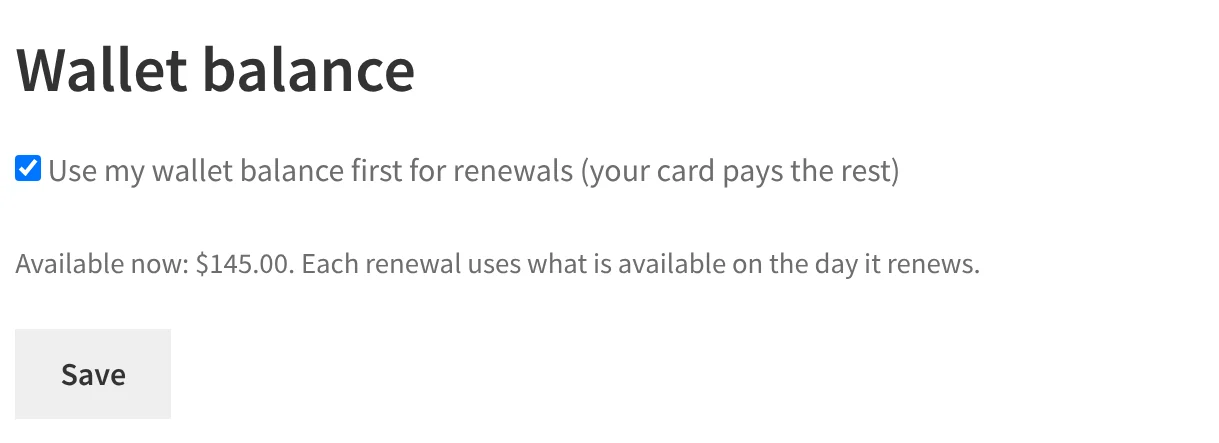
If the card is declined, the wallet part is released and nothing is taken. Before each retry it is worked out again: kept, lowered or removed, never raised.
Two limits. Wallet first is only offered for payment methods that allow the renewal amount to change, so not for PayPal Standard. And it applies to scheduled renewals: a customer who clicks “Renew now” early is charged the full amount on their card.
The rest of the six questions
- No double charge. A renewal that Subscriptions runs twice is charged once.
- The customer’s choice. A subscription renews from a wallet only when its customer chose that, or staff allowed to adjust that wallet set it.
- Cashback. A renewal paid from the wallet earns order cashback like any other order, unless you untick “Count the part paid from the wallet” on the rule.
The short version
WooCommerce Subscriptions will renew from store credit if the wallet is built to be charged on the renewal date. Before you pick a tool, find out what it does when the balance is short, and turn on Subscriptions’ retry system either way. Use wallet only for prepaid customers and wallet first for customers who earn credit and keep a card on file. And warn people before a renewal their balance will not cover: that one email saves most of the failures.
If your store credit mostly comes from returns, How to refund to store credit in WooCommerce, and when to offer it covers when to offer it and when the customer decides.
From the RoundBorders team
Need a hand with your site?
Tell us what’s going on. We send a fixed price, usually within a few hours.
- Nothing to pay until you approve a price
Write as much as you like: what's happening, what you want, links, errors. The more we know, the more exact your fixed price.
Founder of RoundBorders. Building and fixing WordPress sites since 2012; our work is listed in the WooCommerce, Pressable and Jetpack partner directories.
Sources
- Subscription renewal process, WooCommerce
- Failed recurring payment retry system, WooCommerce
- Account Funds for WooCommerce, WooCommerce Marketplace
Found a mistake? Write to me.