
Plugins › Elite Balance › Rewards and loyalty
Loyalty rewards for WooCommerce
Rewards they can spend like money.
Elite Balance pays cashback, welcome, review, birthday and top-up rewards as store credit in a customer wallet. No points, no conversion chart.
Full refund within 30 days of purchase, through WooCommerce.com.
- Approved for the WooCommerce Marketplace
- Block checkout and HPOS ready
- Every reward is a row in a ledger you can audit
Cashback on the way: $4.50, added to your wallet from December 12.
Amounts come from the rules in our demo store. Order cashback and top-up bonuses wait out your refund window before they can be spent.
One $90 order, two programs
Points ask customers to do maths. Store credit does not.
- 5 points per $1 spent
- 450
- 100 points
- = $1.00 off
- Minimum to redeem
- 500
- Spendable today
- $0.00
An invented example to show the mechanics, not a specific plugin.
- 5% of $90.00
- $4.50
- Spendable on any order
- $4.50
A reward in dollars needs no chart, and nobody writes to support asking what 450 points are worth.
What earns
Five moments worth rewarding.
Switch on the ones you want. Each is a rule with its own amount, limits and dates.
Order cashback
A percentage or a fixed amount when an order is paid. Limit it by minimum order, product, category or customer role.
Each rule decides whether the part paid from the wallet earns too.
- Items
- $100.00
- Coupon
- -$10.00
- Shipping and tax
- not counted
- Earns on
- $90.00
- 5% cashback
- +$4.50
Sign-up
A welcome credit when an account is created. New customers only, unless you choose other roles.
Product review
Paid when you approve the review, and only to a customer who bought that product.
Top-up bonus
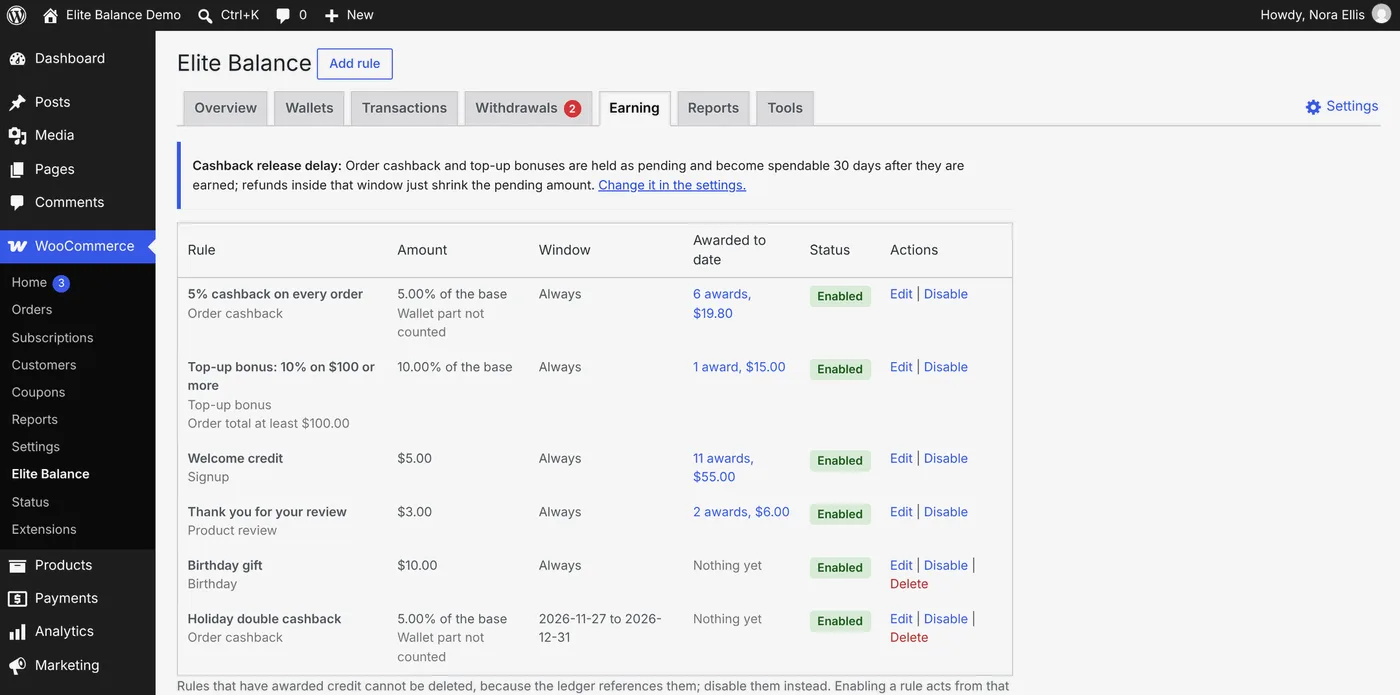
Extra credit when a customer adds funds, such as 10% on top-ups of $100 or more.
Birthday
Once per calendar year, from an optional birthday field in My Account. February 29 is honoured on the 28th.
Setting it up
A rule reads like a sentence.
Pick the moment first. The form then shows only the fields that apply, so nothing irrelevant is on screen.
Rule: Holiday double cashback
When an order is paid, give back 10% of the items, if they total at least $50 and include Shoes or Bags, from November 27 to December 31.
- Percentage or fixed amount
- Minimum order
- Products
- Categories
- Roles
- Campaign dates
None. Order cashback uses them all.
Rule: Top-up bonus: 10% on $100 or more
When a top-up is paid, add 10% on top, if the top-up is at least $100.
- Percentage or fixed amount
- Minimum top-up
- Roles
- Campaign dates
- Products
- Categories
Rule: Welcome credit
When an account is created, give $5.00 to new customers.
- Fixed amount
- Roles
- Campaign dates
- Percentage
- Minimum order
- Products
- Categories
Rule: Thank you for your review
When a review is approved, give $3.00 for a review of any product the customer bought.
- Fixed amount
- Products
- Roles
- Campaign dates
- Percentage
- Minimum order
- Categories
Rule: Birthday gift
When it is a customer's birthday, give $10.00, once per calendar year.
- Fixed amount
- Roles
- Campaign dates
- Percentage
- Minimum order
- Products
- Categories
- Campaign dates. Give any rule a start and an end, for a double cashback week.
- Nothing retroactive. A rule acts only on what happens after you turn it on.
- Disable, never lose. A rule that has paid out keeps its history for good.
Refunds
Cashback waits until your refund window has passed.
So nobody earns a reward, spends it, then returns the order. Follow one $90 order through a 30-day delay.
Set the delay from 0 to 90 days. The default is 30. Sign-up, review and birthday rewards carry no refund risk, so they credit at once. With no delay, a refund reverses the cashback automatically and never takes a wallet below zero.
What it costs you
Price a cashback rule before you switch it on.
Simple arithmetic on your numbers, before refunds and limits. The credit is spent on a later order in your store, and you can let unspent reward credit expire.
What it does, and what it leaves out.
- Cashback by percentage or fixed amount
- Sign-up, review and birthday rewards
- Bonuses on wallet top-ups
- Campaign dates on any rule
- Expiry for reward credit, if you want it
- An email when a reward is credited
- Automatic reversal when an order is refunded
- The whole wallet: payments, refunds, top-ups
Not in the box
- Points and conversion rates
- Tiers, levels and badges
- Referral rewards
If your program depends on these, a points and rewards plugin will suit you better.
Need something it does not do yet? Ask.
Tell us what your store needs. We read every request and answer it ourselves, and there is a good chance it ships in a future release.
- Subscription renewals from the wallet
- Store credit expiry
- Reports
- 12 languages
- Your request could be next
FAQ
Questions about rewards.
What store owners ask before they switch a rule on.
Is this a points and rewards plugin?
It is a rewards plugin without points. Customers earn store credit in your store's currency and spend it at checkout like money. There are no points to convert, no tiers and no referral rewards.
What happens to cashback when an order is refunded?
It goes back too: all of it on a full refund or a cancellation, and in proportion on a partial refund. While the cashback is still pending under the release delay, the pending amount simply shrinks and nothing is taken from the wallet. A wallet never goes below zero.
Can reward credit expire?
Only if you want it to. Expiry is off until you turn it on, and you set the number of days for each kind of credit, so cashback and rewards can expire while money a customer paid in stays put.
Can I limit cashback to some products or customers?
Yes. An order cashback rule can ask for a minimum order and be limited to products, categories and customer roles. Review rewards can be limited to products, and every rule can be limited to roles.
Can I run a double cashback week?
Yes. Add a cashback rule with a start and an end date, in your store's timezone. It acts only on orders paid between those dates, and nothing is ever awarded for orders placed before a rule was switched on.
Where do customers see their rewards?
On the wallet page in My Account: the balance, every reward as a line with its reason, and pending cashback with the date it becomes spendable. Each rule can also send an email when its reward is credited.
Reward customers in money they understand.
Rewards are one part of Elite Balance. The same licence covers wallet payments, refunds to store credit, top-ups and withdrawals.
See everything Elite Balance does ›Page updated by the RoundBorders team. Amounts on this page are examples from our demo store. More about Elite Balance, and how to move to it from TeraWallet or WP Swings.